Every wedding album starts with one slow step: the couple has to choose the photos. A studio shoots two or three thousand photos across the haldi, mehendi, sangeet, wedding and reception, the family needs to pick three or four hundred, and until they do, the album waits. A photo selection app moves that step out of WhatsApp chats and pen drives and onto the family's phones.
This guide explains what a photo selection app does, what to look for before you pick one, and a simple workflow that keeps albums moving through the wedding season.
What a photo selection app does
A photo selection app (also called online photo selection software) puts your photos in one private gallery. You send the couple a link, they mark the photos they want, and you receive the list of chosen file names. You then filter those photos in Lightroom or your album software and start designing.
The good ones do more than show photos. They count the picks against the album's size, show a deadline, let the family leave notes on a photo, and lock the choice when the family is done, so you never design from a list that is still changing.
Why WhatsApp and Google Drive slow the album down
- Blurry photos. WhatsApp shrinks every photo, so the family chooses from copies that look worse than your work.
- Lost in the chat. A chat with 2,000 photos is hard to scroll, and replies arrive as screenshots, voice notes and file numbers typed by hand.
- No count. Nobody knows how many photos were picked until someone counts, and the family often picks 600 for a 300-photo album.
- No end date. Without a visible deadline, selection drags on for months, and so does your payment for the album.
- Mistakes. One wrong file number puts the wrong photo in a printed album.
What to look for in a photo selection app
- Opens in the phone's browser. Couples and parents should not have to install an app or make an account.
- Photos grouped by function. Choosing the mehendi photos, then the wedding photos, is far easier than one long list.
- A limit counter. The family sees how many they have picked against your limit, for example 280 of 300.
- A visible deadline. Seven to ten days on the screen keeps everyone moving.
- Notes on a photo. “A little brighter” or “remove the person in the background” should reach you with the list, not in a phone call.
- One shared list for the family. The bride's sister and mother should see the same hearts, not make three different lists.
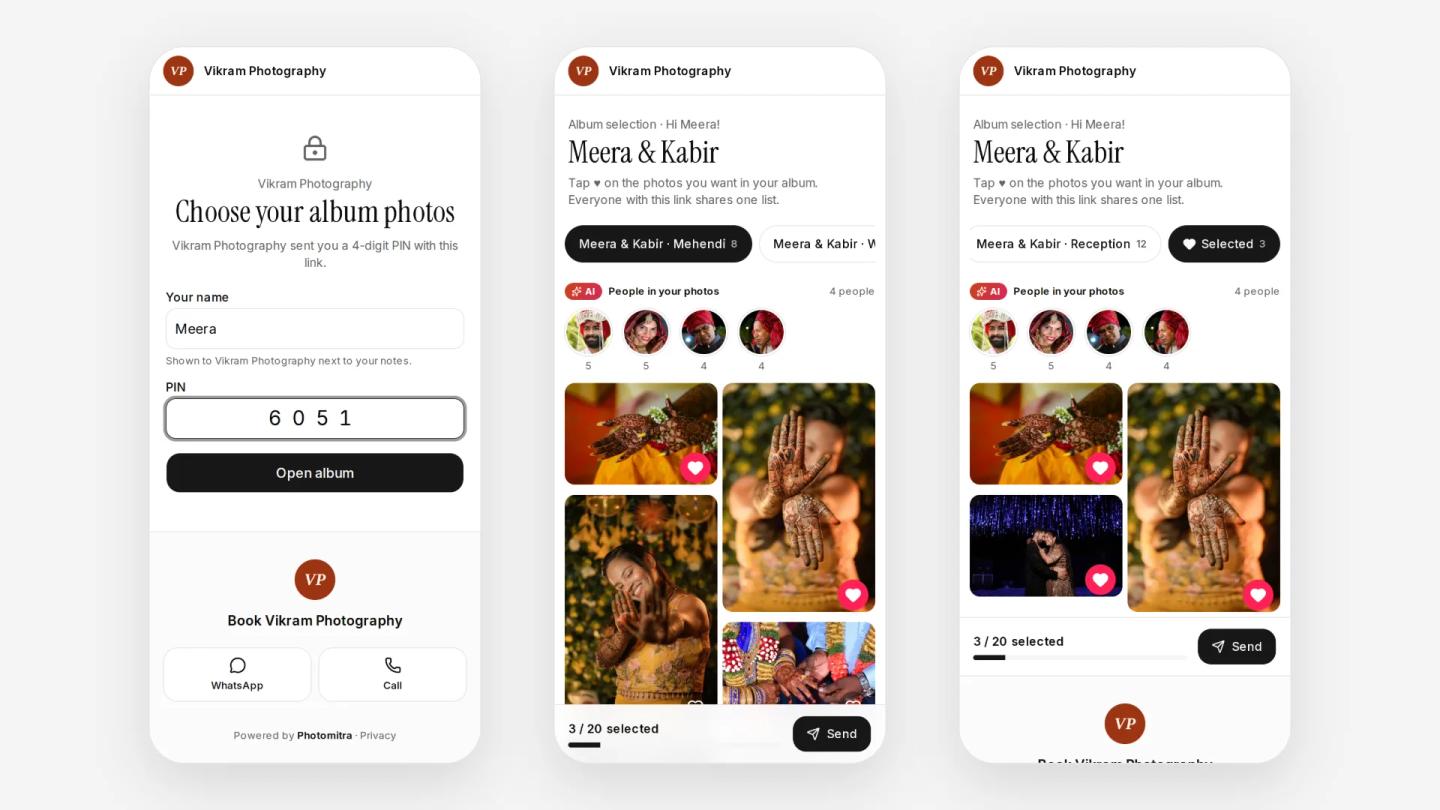
- Privacy. A private link, ideally with a PIN, because wedding photos are personal.
- A file list for Lightroom. You should be able to paste the chosen file names into Lightroom's filter or download them as a spreadsheet.
- A way to find people. With hundreds of guests, a filter that shows one person's photos at a tap saves the family a lot of scrolling.
Free or paid?
For a small shoot, a shared Google Drive or Google Photos album is free and good enough. For a wedding album it misses the parts that save time: there is no limit counter and no deadline, nothing locks when the family is done, and you still collect the file names by hand.
Paid photo selection software is made for this one job. Some studios buy it as a separate tool; others get it inside a bigger plan with photo delivery and albums, which usually costs less than paying for several tools.
A simple album selection workflow for the wedding season
- Cull first. Remove blinks, duplicates and test shots. Send your best photos, usually two to four times the number the album will hold.
- Upload by function. Haldi, mehendi, sangeet, wedding, reception: one group each.
- Set the limit and the deadline from the album you have planned: sheets, layout and a little room for changes.
- Send the link on WhatsApp with a short message (an example is below).
- Remind once, two days before the deadline.
- When they submit, paste the file names into Lightroom's filter, check the notes, and start the design.
Tip
Message to send with the link: “Namaste! Your wedding photos are ready for album selection. Please tap the heart on the photos you want, up to 300, by Sunday 8 November. Everyone in the family can use this same link. PIN: 4821.”
Doing it in Photomitra
Photomitra's photo selection software does the steps above: photos grouped by function, a limit and a deadline the family can see, hearts and notes, an optional 4-digit PIN, and one shared list for everyone with the link. A row of faces lets the family tap a person and see only their photos. When they submit, the choice locks and you copy the file names into Lightroom or download a spreadsheet.
It comes in the same plan as live photo sharing, the 3D e-album and your portfolio website. See the plans.
Share this post
Written by the Photomitra teamWe build live photo delivery, album selection and studio software for wedding and event photographers in India, and set it up with them on WhatsApp. About us